
Over the past weekend, I updated Go There Now with the goal of bringing this outdated 2015-era Android app up to basic 2026 Android development standards.
Originally written and maintained by me as a personal Android project, Go There Now had not received any updates since October 2015. The app was written entirely in Java and relied on several libraries and frameworks that have since been deprecated or replaced.
My objective was to modernize the project to support Android 16, update the architecture to use modern Jetpack libraries, add Wear OS support, and migrate the UI to Material 3 Expressive.
To help guide the modernization effort, I leveraged Cursor, an agentic AI coding tool, to assist with planning and implementing the migration.
Key Takeaways
-
A 10-year-old Android codebase was modernized to 2026 Android standards
-
The migration was completed in about three hours
-
Cursor AI helped automate large portions of the refactoring process
-
Human validation was still required for Gradle builds, runtime testing, and UI validation
-
Legacy frameworks such as ButterKnife, Picasso, and Android Wear were replaced with modern alternatives
Migration Strategy Using Cursor
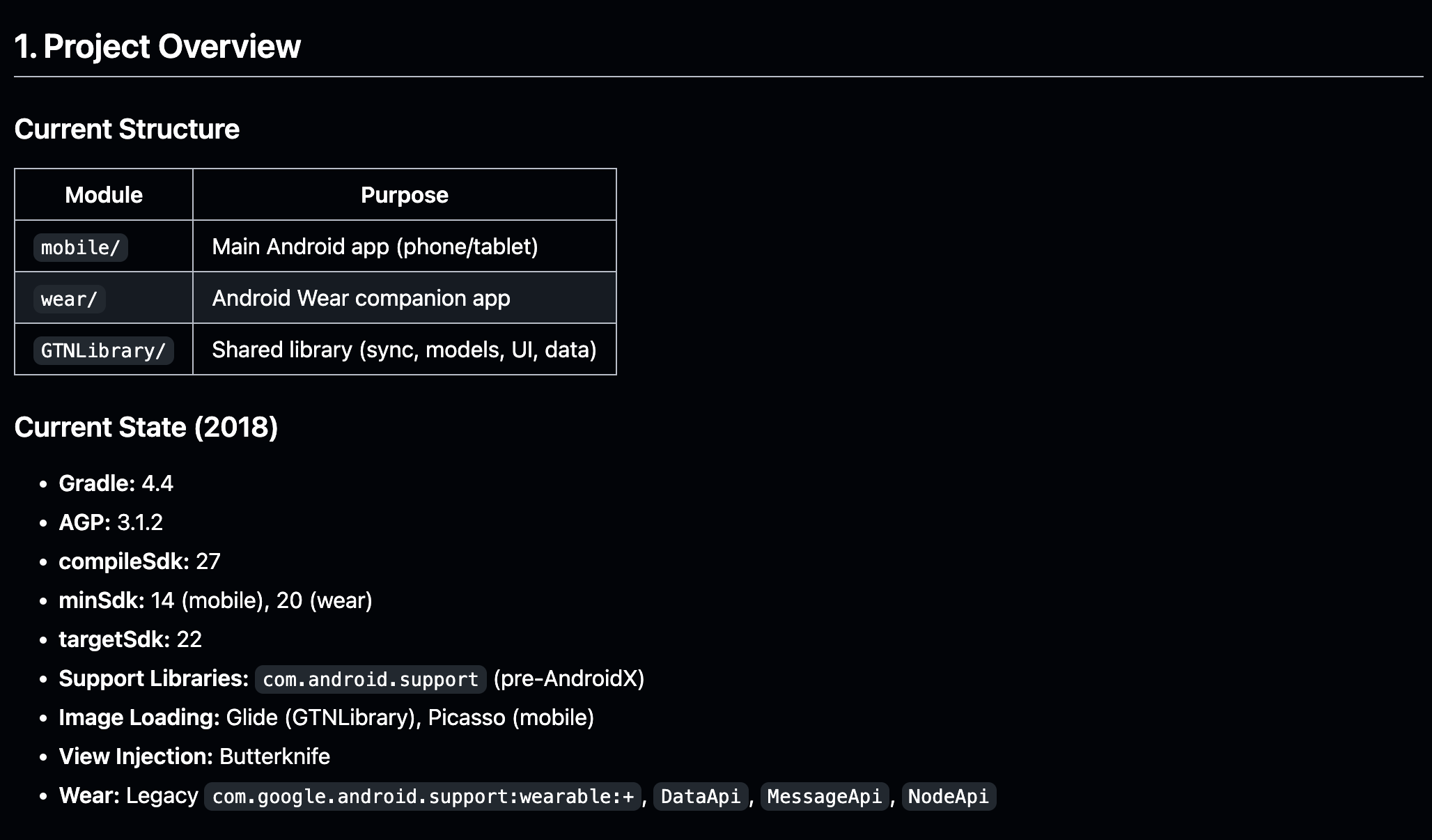
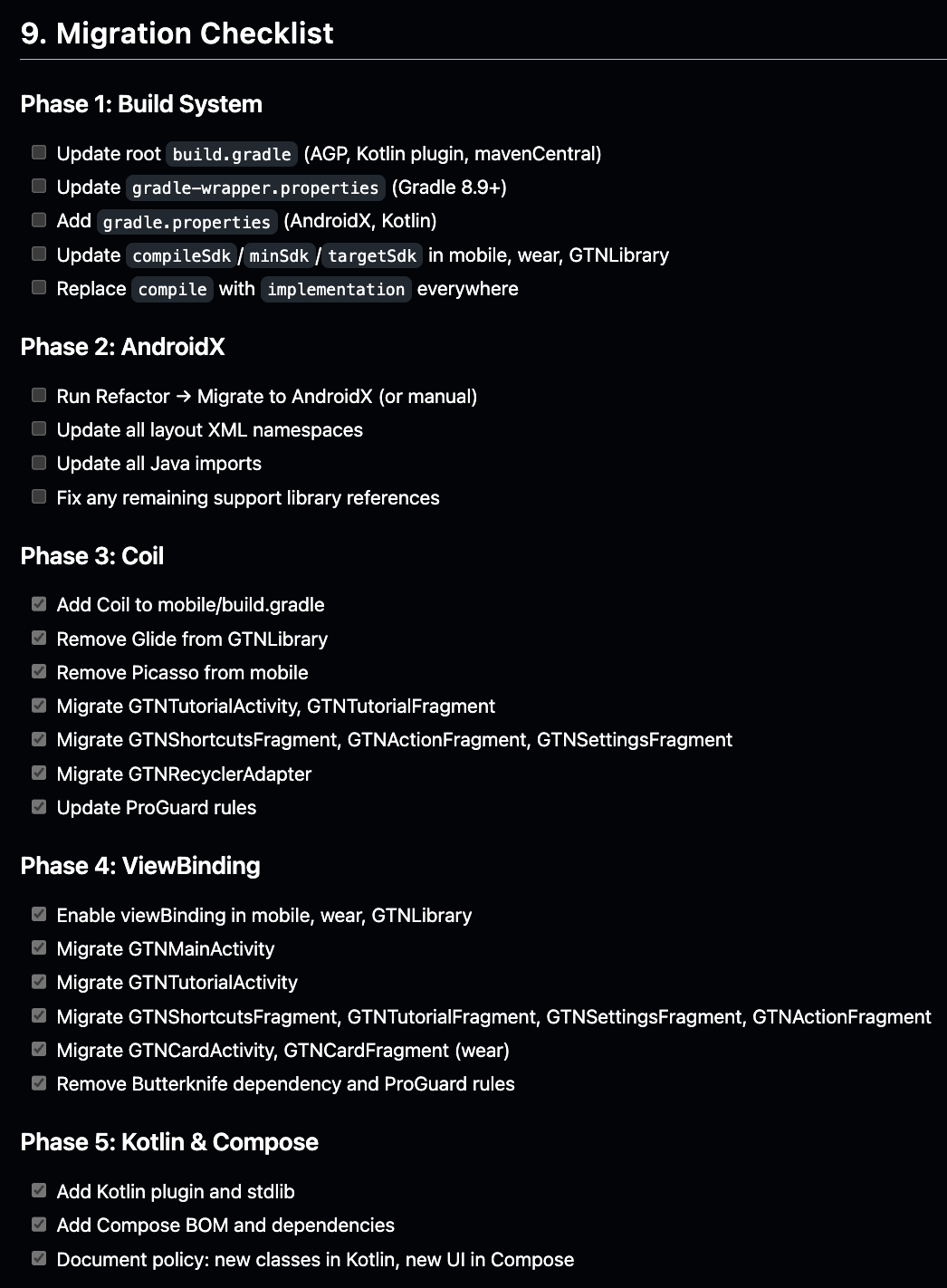
Before making any code changes, I asked Cursor to generate a migration plan outlining the modernization process.
The goal was to perform the migration in incremental phases, allowing the application to be validated after each stage.
For this process, I relied on Cursor’s Composer 1.5 model.
The migration plan was divided into the following phases:
Phase 1: Build System & SDK Updates
Phase 2: AndroidX Migration
Phase 3: Image Loading Migration — Glide & Picasso → Coil
Phase 4: ButterKnife → ViewBinding
Phase 5: Kotlin & Jetpack Compose Support
Phase 6: Android Wear → Wear OS
Phase 7: Wear OS Data Layer API Migration
Phase 8: Material Design 1 → Material 3 Expressive
Here’s a portion of what Cursor generated prior to executing the migration plan:
Development Workflow with Cursor
For each migration phase, I compiled the project to ensure there were no major regressions or build failures. Many times the project initially failed to compile. In those cases, I provided Cursor with the Gradle build logs, allowing it to diagnose and fix the errors.
Other issues surfaced during runtime testing:
-
Application crashes
-
UI layout inconsistencies across different Android OS versions
-
Dependency conflicts
-
Gradle build configuration issues
Whenever these occurred, I validated the changes directly in Android Studio, testing the application on emulators and physical devices.
This workflow effectively turned Cursor into an AI pair-programmer, while I handled the validation and debugging.
Tech Stack Modernization Summary
The modernization effort resulted in the following updates to the application’s technology stack:
| Area | 2015 Stack | 2026 Stack |
|---|---|---|
| Language | Java | Java + Kotlin |
| UI | XML Layouts | XML + Jetpack Compose |
| UI Framework | Android Support Libraries | AndroidX |
| Design System | Material Design 1 | Material 3 Expressive |
| Image Loading | Picasso | Coil |
| View Binding | ButterKnife | ViewBinding |
| Wearables | Android Wear | Wear OS |
| Networking | Minimal | OkHttp + Retrofit + Moshi |
| Observability | None | Crashlytics + Analytics + LeakCanary |
Major Updates in Go There Now 3.00
The modernization effort resulted in the following updates:
-
Replaced outdated Android Wear implementation with modern Wear OS support
-
Migrated the application design to Material 3 Expressive
-
Migrated the project to AndroidX dependencies
-
Updated the application to support Android 16
-
Updated the build system to Android Gradle Plugin (AGP) 9.0.1
-
Added Kotlin and Jetpack Compose support
-
Replaced Picasso with the Coil image loading library
-
Migrated to the Google Places API for autocomplete functionality
-
Updated all dependencies to their latest stable versions
-
Removed several outdated libraries
-
Added networking support using OkHttp, Retrofit, and Moshi
-
Added Firebase Crashlytics, Firebase Analytics, and LeakCanary
-
Added a new APPLICATIONS screen for installing other Y-Corner apps
-
Updated tutorial screenshots to use Pixel 6 Pro and Wear OS images
-
Added loading states and empty states for the shortcuts list
-
Removed unnecessary location permissions
-
Added edge-to-edge UI support for Android 15+
Before vs After Architecture
When I originally wrote Go There Now in the early Android Wear era (around 2014–2015), the Android ecosystem looked very different from today.
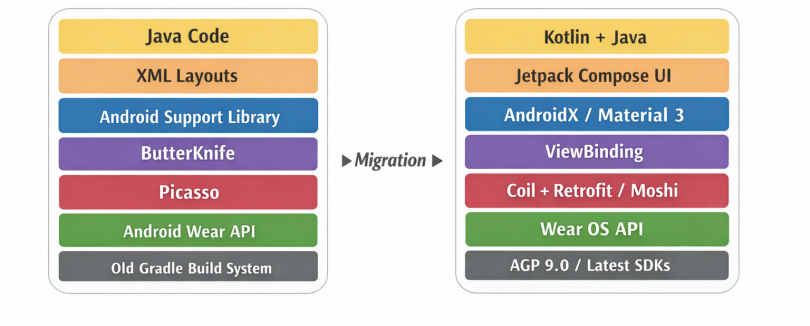
Original 2015 Architecture
-
Entirely Java-based
-
XML layouts
-
Android Support Libraries
-
ButterKnife
-
Picasso
-
Android Wear APIs
-
Minimal architectural separation
Modernized 2026 Architecture
After the modernization effort, Go There Now 3.00 now uses a far more modern Android stack:
-
Java + Kotlin hybrid codebase
-
Jetpack Compose support
-
AndroidX
-
Material 3 Expressive
-
ViewBinding
-
Coil
-
Wear OS APIs
-
OkHttp / Retrofit / Moshi
-
Firebase Crashlytics & Analytics
-
LeakCanary
Lessons Learned Using Agentic AI for Android Development
Using Cursor as an agentic AI development assistant significantly accelerated the modernization process.
AI is excellent at
-
Generating migration plans
-
Refactoring large sections of code
-
Updating Gradle dependencies
-
Replacing deprecated APIs
-
Performing repetitive modernization tasks
AI still struggles with
-
Gradle dependency conflicts
-
Android build system quirks
-
Runtime crashes
-
UI layout inconsistencies across Android OS versions
-
Android lifecycle complexity
Because of this, I still needed to:
-
Review AI-generated code
-
Resolve build failures
-
Test on emulators and devices
-
Validate UI changes
In practice, the most effective approach was treating Cursor as an AI pair programmer, not a fully autonomous agent.
How Long the Migration Took with AI
One of the most interesting aspects of this modernization effort was how quickly it was completed.
The entire migration of Go There Now — including dependency upgrades, library replacements, architecture modernization, and Wear OS support — took roughly three hours on a Sunday afternoon using Cursor.
Considering that the codebase had not been updated since 2015, this represents a substantial amount of technical modernization completed in a short period of time.
Without AI-assisted development, this process likely would have taken several days, particularly due to the number of framework migrations involved.
The AI helped accelerate the process by:
-
Generating a structured migration plan
-
Implementing refactors incrementally
-
Suggesting modern library replacements
-
Updating dependencies automatically
The remaining time was spent on human validation tasks such as:
-
Fixing Gradle build issues
-
Testing in Android Studio
-
Verifying functionality on devices and emulators
AI and the Changing Landscape of Software Engineering
AI has created massive disruption in the world of software engineering.
Tools that can generate and refactor code rapidly are already changing how software is written and maintained. At the same time, these tools also introduce new challenges. Engineers still need to validate correctness, debug issues, and make architectural decisions. The role of developers may increasingly shift toward architecting systems, validating AI-generated code, and guiding automated tooling.
The world of software engineering has already changed dramatically over the past year — and it will likely continue evolving rapidly in the months ahead.
Download Go There Now 3.00
Go There Now 3.00 can be downloaded here: https://www.yoonhuh.com/blog/apps/go-there-now/