
New updates for all Y-Corner Android apps are available today!
This collection of releases introduces major new features for Go There Now and Robot Master Database, along with expanded music support across several retro game companion apps. Other updates include new theme options, content additions, interface improvements, compatibility updates, and bug fixes.
With these releases, support for Android 6.0 has ended across the entire Y-Corner app collection. Going forward, all Y-Corner apps will require Android 7.0 Nougat or newer.
Go There Now v4.00
Go There Now 4.00 is a major update that greatly expands how navigation shortcuts can be created, organized, and launched.
In addition to Google Maps, navigation shortcuts can now be opened with:
- Waze
- HERE WeGo
- Yandex Maps
- MapQuest
- Organic Maps
- Apple Maps through the web
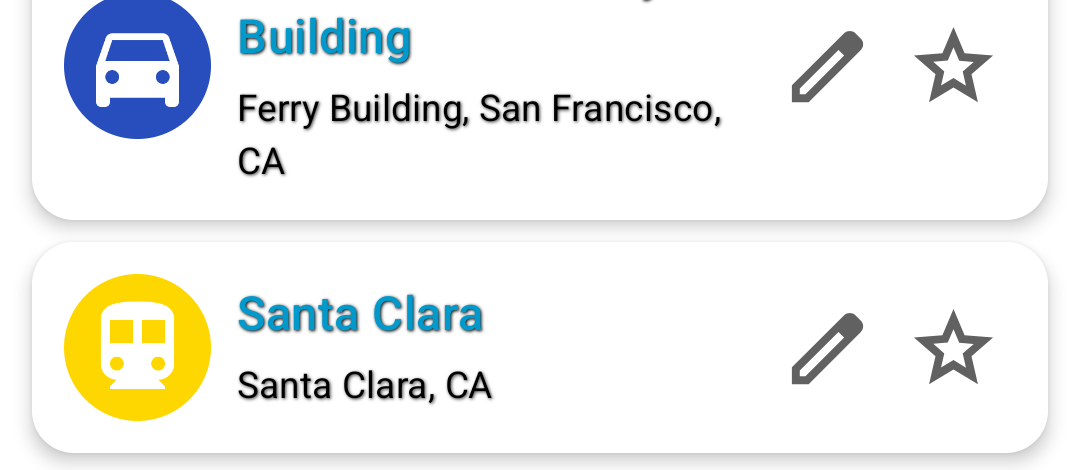
Shortcuts can now be filtered by type or marked as favorites, making frequently used destinations easier to find. You can also swipe a shortcut away to delete it and choose a default map app under Settings.
Android App Shortcuts have also been added. By long-pressing the Go There Now app icon, you can quickly create a new navigation shortcut or launch one of your favorite destinations without first opening the app.
Address entry has been improved with Google Places autocomplete, while the redesigned interface now uses Material 3 styling and supports light, dark, and system themes.
Go There Now v4.00 Highlights
- Added support for Waze, HERE WeGo, Yandex Maps, MapQuest, Organic Maps, and Apple Maps on the web.
- Added filters for viewing different types of navigation shortcuts.
- Added the ability to mark shortcuts as favorites.
- Added long-press App Shortcuts for creating new shortcuts and opening favorite destinations.
- Added Google Places autocomplete when entering addresses.
- Added light, dark, and system theme options.
- Added swipe-to-delete support for navigation shortcuts.
- Added an option for selecting the default navigation app.
- Redesigned the shortcut list and updated the interface with Material 3 styling.
- Fixed an issue that prevented the shortcut list from refreshing after a new shortcut was added.
Robot Master Database v1.28
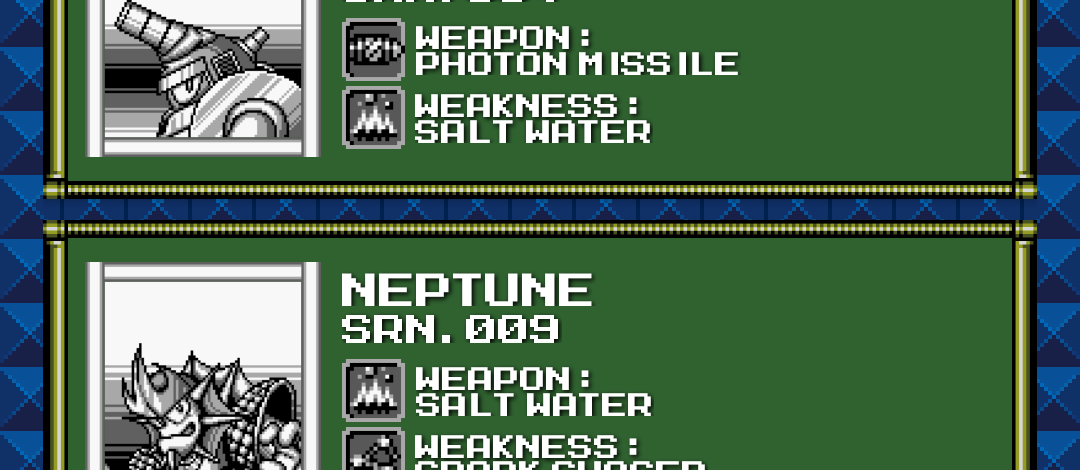
Robot Master Database v1.28 adds support for all five classic Mega Man Game Boy games.
You can now browse bosses and stages from Mega Man: Dr. Wily’s Revenge, Mega Man II, Mega Man III, Mega Man IV, and Mega Man V. Music from all five games is also available through the app’s Music screen.
The Music section has been expanded to include all tracks from:
- Mega Man 1–6 for NES
- Mega Man & Bass
- Mega Man I–V for Game Boy
The update also adds maps for the Dr. Wily stages from Mega Man 11, adjusts the Frost Man and Bounce Man sprites, and introduces a new flying animation for Beat.
Robot Master Database v1.28 Highlights
- Added bosses, stages, and music from Mega Man I–V for Game Boy.
- Added complete music collections from Mega Man 1–6, Mega Man & Bass, and the five Game Boy games.
- Added maps for the Mega Man 11 Dr. Wily stages.
- Updated the Frost Man and Bounce Man sprites.
- Added a new Beat flying animation for Mega Man 11.
- Corrected Beat’s animations for Mega Man 8 and Mega Man & Bass.
- Fixed clipped main-screen button text on phones in landscape orientation.
More Accurate Retro Game Music Playback
Several Y-Corner apps now use the open-source Game Music Emu library to play music from classic NES, SNES, and Game Boy games.
This allows the apps to play supported game-music formats directly, providing more authentic and accurate playback while also making it possible to include much larger selections of music.
Game Music Emu support has been added to:
- Chrono Maps
- Cid’s Aerial Views
- Dragon Geo
- Link to the Map
- Robot Master Database
Chrono Maps v1.31
Chrono Maps now includes a dedicated Music screen for tracks from Chrono Trigger and Chrono Cross. The complete Chrono Trigger soundtrack is available for playback using the new SNES audio support.
The update also resolves status-bar and three-button navigation issues affecting Android 7.0 devices.
Cid’s Aerial Views v1.40
Cid’s Aerial Views now includes a dedicated Music screen featuring the complete soundtrack from Final Fantasy IV for SNES.
The update also fixes system-bar and navigation-bar layout issues on Android 7.0 devices.
Dragon Geo v1.41
Dragon Geo receives a major expansion to its Music section, adding tracks from:
- Dragon Warrior I–IV for NES
- Dragon Warrior I–III for Game Boy
- Dragon Quest I–III, V, and VI for Super Famicom
A new filter row makes it easy to switch between games, while landscape and large-screen layouts now display two music entries per row.
The update also restores missing play and stop controls in landscape mode and fixes a crash that could occur when viewing maps on Android 7.0 devices.
Link to the Map v1.06
Link to the Map now includes a dedicated Music screen featuring the complete soundtrack from The Legend of Zelda: A Link to the Past.
The update also fixes a map-viewing crash affecting Android 7.0 devices.
Additional App Updates
Dragon Alchenomicon v1.08
- Adjusted the Alchemy screen’s ingredient buttons in portrait and landscape orientations.
- Fixed system-bar and three-button navigation issues on Android 7.0 devices.
- Fixed an issue that caused the screen to blink when changing languages.
DexTrail v1.05
- Added a System theme option that follows the device’s light or dark theme.
- Fixed several interface issues affecting Android 7.0 devices.
Map of the Nocturne v1.15
- Moved all single-use inventory items into the Items category.
- Renamed several inventory filter buttons.
- Fixed music shuffling behavior on castle sub-area maps.
- Fixed an extended freeze that could occur when leaving the Dracula’s Castle map while sections were still loading.
- Resolved system-bar and navigation-bar issues on Android 7.0 devices.
Suiko Cartography v1.13
- Revised the Recruit Conditions for several Stars of Destiny from Suikoden I–V.
- Fixed clipped map labels on several Suikoden IV maps.
- Improved text visibility when using the Suikoden III, IV, and V window styles.
- Fixed several interface issues affecting Android 7.0 devices.
Synthesis Compendium v1.05
- Updated the monster roster and synthesis combinations for Dragon Quest Monsters: The Withered World.
- Added a System theme option that follows the device’s light or dark theme.
- Refined the Apps screen layout.
- Fixed several interface issues affecting Android 7.0 devices.
Android 7.0 Is Now Required
Support for Android 6.0 Marshmallow has ended for all Y-Corner apps.
Beginning with today’s releases, the minimum supported operating system across the entire Y-Corner app collection is now Android 7.0 Nougat. Devices running Android 6.0 will need to continue using an earlier compatible version of each app.
The latest versions of all Y-Corner apps can be downloaded from the Y-Corner Apps page.